

While we hope that you are fully satisfied with your order, we understand that sometimes you might have second thoughts.
To arrange a return of your order, please visit https://dpd.ie/Returns.
You can easily fill out the Returns Form to arrange a pickup of your order for return at a designated DPD Pickup Point, and print an accompanying label to affix to your return.
Please follow our instructions below to arrange a return of your order to Würth Ireland.
• Choose Returns through Parcel Wizard and login to continue, or choose Continue as Guest.
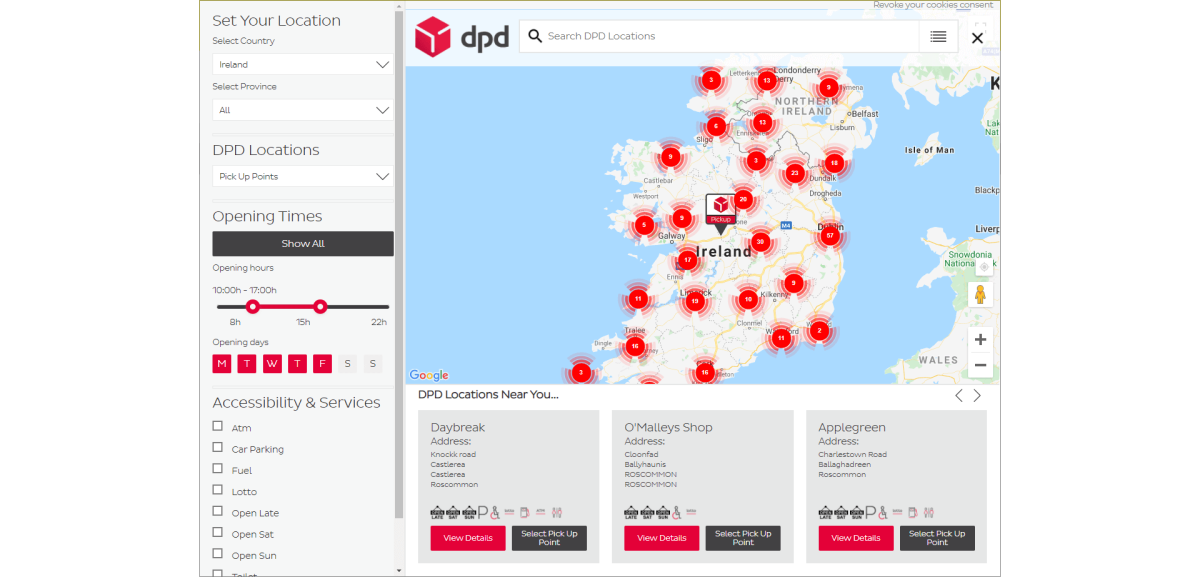
• Use See All Pickup Points to select a Pickup Point on the map. DPD offer more than 300 pickup points nationwide.
• At Step 1 – Select Retailer, choose Wurth Ireland Returns from the Choose a Retailer* dropdown menu.
• Enter a reference number for this return and select a reason for return from the dropdown menu. You can find the reference number on the reverse of your order delivery note.

• At Step 2 – Parcel Details, choose the size and weight of your return item. You can also choose to add additional parcels.
• At Step 3 – Payment, enter your contact details.
• At Step 4 – Print Label, click Generate Label to print your returns label and click Complete.
• To complete your return, bring your parcel with the printed label to your chosen DPD Pickup Point.
Visit https://dpd.ie/Returns to arrange your return now
The Adolf Würth GmbH & Co. KG collects and processes the personal data provided in the form in order to process the requested request for you. Please note the mandatory fields in the forms. The legal basis for this processing, the absolutely necessary data, is Art. 6 para. 1 lit. b GDPR, implementation of a pre-contractual measure. The processing of data voluntarily provided by you is carried out on the basis of Art. 6 para. 1 lit. f GDPR. Thereafter, processing is permissible which is necessary to safeguard our legitimate interests. Our legitimate interest is to have contact with you, our customers, to improve our consulting quality and to be able to contact you more easily in case of possible queries. The data collected will only be stored by us for as long as is necessary to process your enquiry and to contact you. They are then deleted.
Supplementary data protection information, in particular regarding your rights to information, correction, deletion, restriction of processing, objection and complaint, can be found in our data protection declaration.